Philips Support
My Philips Wake-Up Light is not turning on
Published on 2021-12-02
If your Philips Wake-Up Light is not switching on or responding, try our troubleshooting advice below to solve this issue.
-
Depending on the model of Wake-Up Light you have, you may have a few options on how to turn the Wake-Up Light on. While some models have a light button, others also use the radio button to switch on. If you press the button for too long or too hard, your Wake-Up Light will not respond. Press the button briefly and gently to turn your Wake-Up Light on. -
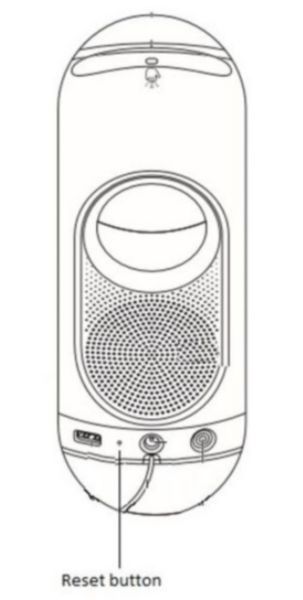
If the Wake-Up Light is not responding, you can also try resetting it.
You can try resetting your Wake-Up Light by inserting a pin in the back of your device by pressing the reset button.
If you have tried the advice above but your Wake-Up Light is still not turning on, then contact us for further help. -
Step 1. Press and hold alarm 1 for 5 sec.
Step 2. Press and hold 'light on' for 5 sec.
Step 3. Press and hold 'FM radio on' for 5 sec.