Descaling procedure:
1. Empty the drip tray and place it back.
2. If present, remove the classic milk frother or LatteGo from the machine.
3. If AquaClean filter is present, remove it from the water tank.
4. Empty the water tank and pour the entire bottle of Philips descaler solution into it. Add water to the descaling solution in the water tank up to the to the Calc / Clean indication and place it back.
5. Place a large container bowl (1.5L) under the coffee and water spout.
6. Switch ON the machine.
7. Press and hold the Calc / Clean icon for 3 seconds, and then press the start/stop button to start the descaling procedure
8. During the descaling cycle, the Calc / Clean light will flash to show that descaling is in progress.
9. The machine will start dispensing small amounts of water through the coffee and hot water spout 10. Let the machine dispense the descaling solution until the water tank is empty. The empty water tank light icon will light up.
11. Remove the bowl.
12. Remove the water tank and give it a rinse with fresh water.
13. Fill up the water tank with fresh water up to the Calc / Clean indicator and place it back into the machine.
14. Place back the emptied bowl under the coffee and water spout and continue with the rinsing procedure below.
Rinsing procedure:
1. Press the start/stop button to start the rinsing cycle. This process will take about 3 minutes.
2. During this process, the lights on the control panel will go on and off to indicate that the rinsing cycle is in progress.
3. Once the machine stops dispensing water, the descaling process is complete.
4. The machine will heat up automatically.
5. When the lights in the drink icons light up continuously, the machine is ready for use again.
6. The AquaClean light will flash for a while to remind you to install a new AquaClean water filter.
7. Install and activate a new AquaClean water filter in the water tank.
Philips Support
How to descale my Philips Espresso Machine
Published on 14 May 2026
If you notice that the Calc/Clean light is on steadily or the machine displays a prompt for descaling, this indicates the time to descale your Philips Espresso Machine has arrived. It is important to descale your espresso machine regularly to obtain optimal coffee temperature and taste. Follow the steps or watch the videos on how to do this at home.
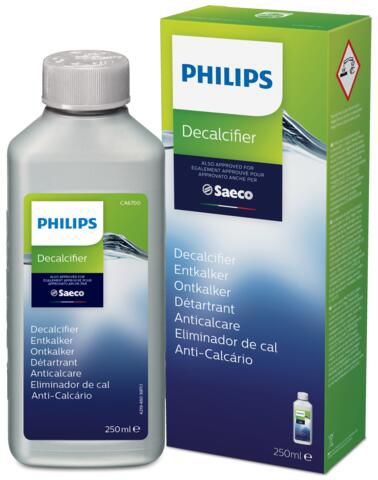
Please note that when descaling your Philips Espresso Machine, you should use Philips descaler only (Descaling solution CA6700).
It is also important not to interrupt the descaling process once it has started. Please, keep in mind that in some cases this process can take up to 30 minutes.
- Play Pause
-
- Touch the "clean" icon on the user interface and select 'Descaling' in the menu.
- Follow the instructions on the screen.
- If attached, remove LatteGo or the milk frother.
- Remove the drip tray and the coffee grounds container, empty them and put them back into place.
- Remove the water tank and empty it. Then remove the AquaClean water filter.
- Pour the whole bottle of Philips descaler in the water tank and then fill it with water up to the Calc / Clean indication. Then place it back into the machine.
- Place a large container (1.5 l) under the coffee dispensing spout and the water spout.
- Press the start/stop button to start the descaling procedure. The descaling procedure lasts approximately 30 minutes and consists of a descaling cycle and a rinsing cycle.
- Wait until the machine stops dispensing water. Refill the water tank when the message appears on the display. The descaling procedure is finished when the machine stops dispensing water.
- Install and activate a new AquaClean water filter in the water tank.
Play Pause -
Descaling procedure:
1. Empty the drip tray and place it back
2. If present, remove the classic milk frother or LatteGo from the machine
3. If AquaClean filter is present, remove it from the water tank
4. Empty the water tank and pour the entire bottle of Philips descaler solution in it. Add water to the descaling solution in the water tank up to the to the Calc / Clean indication and place it back.
5. Place a large container bowl (1.5L) under the coffee and water spout
6. Switch ON the machine
7. Press and hold the Calc / Clean icon for 3 seconds, and then press the start/stop button to start the descaling procedure
8. During the descaling cycle, the Calc / Clean light will flash to show that descaling is in progress
9. The machine will start dispensing small amounts of water through the coffee and hot water spout 10. Let the machine dispense the descaling solution until the water tank is empty. The empty water tank light icon will light up
11. Remove the bowl
12. Remove the water tank and give it a rinse with fresh water
13. Fill up the water tank with fresh water up to the Calc / Clean indicator and place it back into the machine
14. Place back the emptied bowl under the coffee and water spout and continue with the rinsing procedure below.
Rinsing procedure:
1. Press the start/stop button to start the rinsing cycle. This process will take about 3 minutes
2. During this process, the lights on the control panel will go on and off to indicate that the rinsing cycle is in progress
3. Once the machine stops dispensing water, the descaling process is complete
4. The machine will heat up automatically
5. When the lights in the drink icons light up continuously, the machine is ready for use again
6. The AquaClean light will flash for a while to remind you to install a new AquaClean water filter
7. Install and activate a new AquaClean water filter in the water tankPlay Pause -
Important:
- Use Philips descaler only. Do not use products with sulfuric, hydrochloric, sulfamic, or acetic acid (vinegar). These damage the machine and void the warranty.
- Philips descaler is available at www.home-appliances.philips/parts-accessories.
- Skipping descaling also voids the warranty.
Follow the steps below:
- When prompted, press OK to start. To start manually: MENU → START CALC CLEAN → OK.
- The reminder message on the display will indicate to insert milk carafe filled with water to MIN level, open milk spout and to remove AquaClean filter.
- Empty the drip tray and coffee grounds container, and place them back.
- Remove the water tank and empty it.
- Place a 1.5 L container under the coffee spout.
- Pour entire Philips descaler bottle into water tank, then fill with fresh tap water to CALC CLEAN level. Press OK.
- Machine runs descaling cycle (~30 min). Let the machine dispense the descaling solution until the display reminds you that the water tank is empty.
- When tank is empty, rinse and refill with fresh water to CALC CLEAN level.
- Remove and rinse milk carafe, refill to MIN, reinsert, and open milk spout.
- Empty container, place back, press OK.
- The second phase of the descaling cycle, the rinsing phase, starts and lasts 3 minutes. The display shows the rinsing icon and the duration of the phase.
- When finished, tick appears. Press OK to exit. Machine heats and auto-rinses.
- Clean milk carafe and brew group after descaling.
- Install new AquaClean filter.
Tip: AquaClean reduces descaling frequency.
If Interrupted:- Empty and rinse water tank.
- Refill to CALC CLEAN level, restart machine (auto-rinse runs).
Before brewing, do manual rinse:
- Dispense half a tank of hot water.
- Brew 2 cups of pre-ground coffee (without coffee).
- Note: If incomplete, machine will request descaling again soon.
This video will help you to descale your Philips 5000 espresso machine. For a detailed step by step instructions, check the user manual.
Play Pause -
Descaling procedure:
1. Select 'Start Calc Clean' from the menu
2. Press the Cappuccino button to select the descaling procedure
3. The machine reminds you to insert the with water filled milk carafe and pull out the milk carafe dispenser to the right.
4. The descaler symbol appears on the display.
5. Pour the entire bottle of Philips descaling solution in the water tank.
6. Fill the water tank up to the calc clean level.
7. Place the water tank back into the machine.
8. Place a bowl underneath the milk frother and coffee spout
9. Press the cappuccino button to start the descaling cycle.
The display will show the descaling progress. You can pause the descaling cycle by pressing the espresso button. Press the cappuccino button to resume the descaling procedure.
Rinsing procedure:
1. After finishing, rinse the water tank and fill it with fresh water to the maximum level and place back
2. The start rinsing symbol appears on the display.
3. Fill the milk carafe with water up to the minimum level and place back
4. Pull out the milk carafe dispenser to the right.
5. Place back the bowl.
6. Press the cappuccino button to start the rinsing cycle.
The rinsing cycle is finished when the 'Calc Clean OK' symbol appears on the display. Press the cappuccino button to exit the descaling procedure.
Note: If the water tank symbol appears on the display instead of the 'Calc Clean OK' symbol, refill the water tank up to maximum level and perform another rinsing cycle. -
This video will help you to descale your Philips 3000 espresso machine. For a detailed step by step instructions, check the user manual. Play Pause -
This video will help you to descale your Philips 2100 espresso machine. For a detailed step by step instructions, check the user manual. Play Pause -
If you have an other Philips Espresso Machine model, find detailed descaling instruction in the user manual or visit our [Coffee Care] .
Contact Philips
We are happy to help you



