Philips Support
I'm receiving too many "no signal" alerts
Published on 01 June 2026
If your Philips Avent Premium Connected Baby Monitor is sending too many ‘No signal’ alerts on the Baby Monitor+ app, do the following:
-
Check your crib mount to ensure it is installed correctly and that your baby monitor has a proper viewing angle.
-
Make sure no large objects or blankets obstruct the view.
-
Make sure your baby is lying in the detection zone and that the camera is pointed at them.
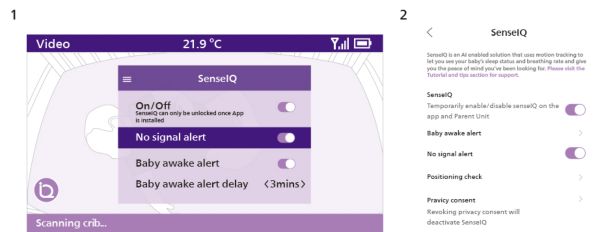
If the above options don’t work, go to Settings > SenseIQ > No signal alert on the app or Parent Unit (see images below) and disable this feature.
If you’ve tried the above steps and are still experiencing issues, contact us.
Image legend:
- Parent Unit SenseIQ Settings
- Baby Monitor+ SenseIQ Settings
Contact Philips
We are happy to help you



