• We’re currently experiencing technical issues with our site. We’re working to resolve the problem as quickly as possible. Thank you for your patience.

Philips Support

How to replace the battery of Philips Touch-up pen trimmer?

Published on 2018-04-06

To replace the battery of your Philips Touch-up pen trimmer please follow our simple instructions below.

Open the battery compartment

Turn the lower part of the trimmer counter clockwise to open the battery compartment.
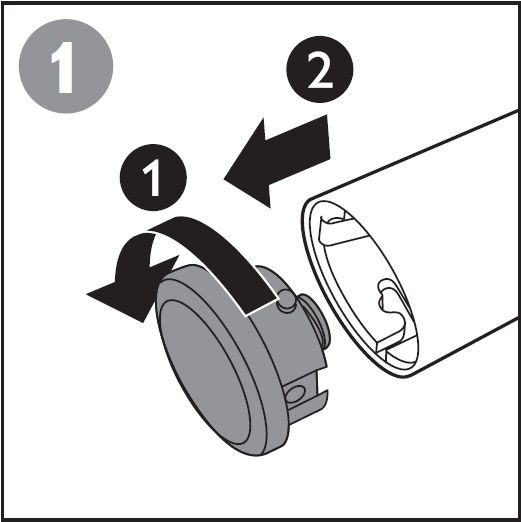
Open battery compartment for Philips Touch-up pen trimmer

Replace the battery

Remove the empty battery and place the new one in. Make sure the plus pole goes in first.
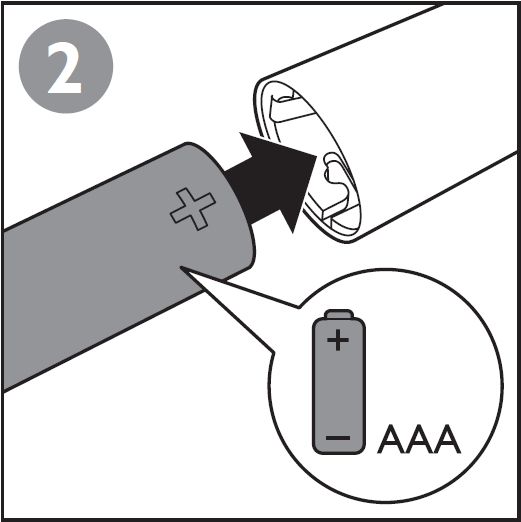
Replace battery Philips Touch-up pen trimmer

Close battery compartment

Place the battery cap back on the trimmer and turn it clockwise to close the battery compartment.
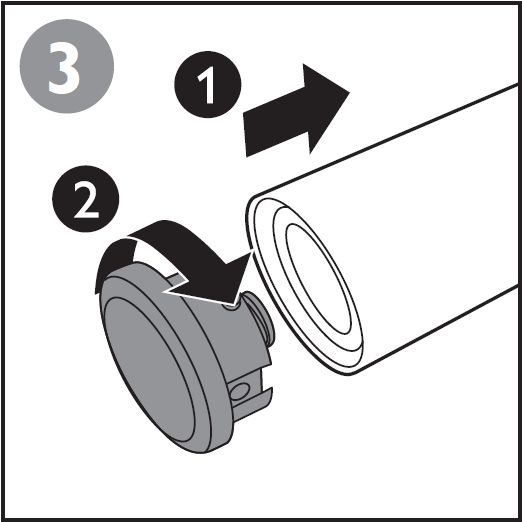
Closing battery compartment Philips touch-up pen trimmer
Contact Philips

We are happy to help you

Contact Philips

We are happy to help you

Looking for something else?

Discover all Philips Support options

Back to top

Our site can best be viewed with the latest version of Microsoft Edge, Google Chrome or Firefox.
