Philips Support

What is Safe Mode and How do I disable it?

Published on 2021-12-10


Safe mode is used to troubleshoot applications.

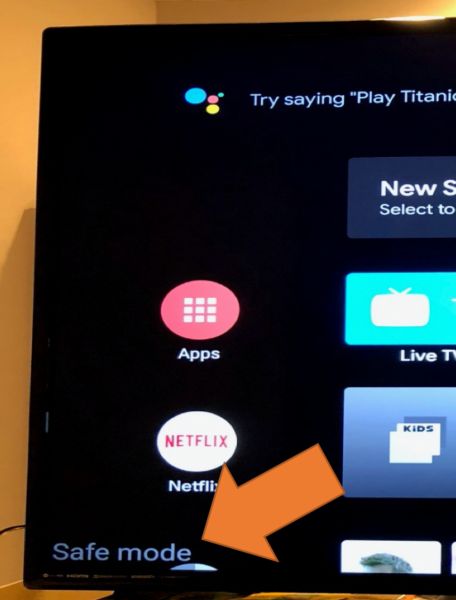
If the TV appears to be in safe mode on the lower left-hand corner you can follow the steps below to get out of it.


NOTE: While Safe mode is displayed on the screen, third-party apps will be temporary disabled
How to exit out of Safe Mode

Exit out of "Safe Mode"

Using the remote control head to

Settings > About > Restart > press "OK" on remote control


Note: if you press and hold down the "OK" button for more than 2.0 seconds the TV will offer to reboot in "Safe Mode". Make sure you only press and release to avoid rebooting back into "Safe Mode".


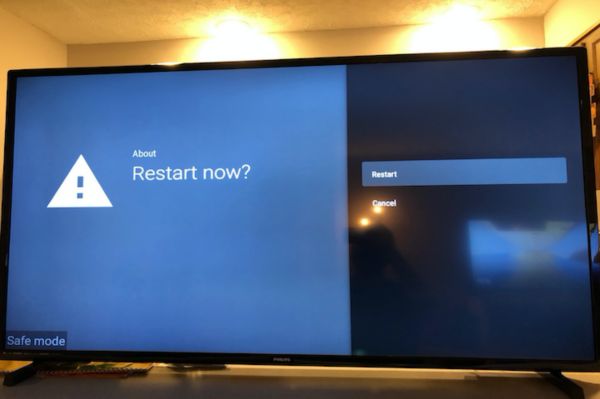
If you have correctly selected OK and not held it, you will see this screen. Select Restart

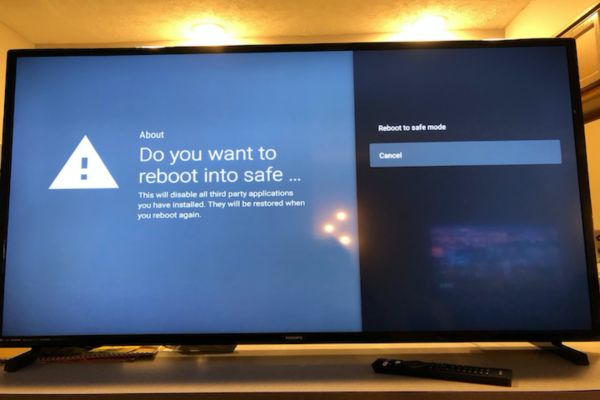
What if I held the OK too long and I see the Restart Into Safe Mode option?

Select "Cancel" and then repeat the steps above if you see this screen.


The information on this page applies to the following models: 50PFL5806/F7 , 43PFL5766/F7 , 65PFL5766/F7 , 55PFL5766/F7 , 50PFL5766/F7 , 32PFL5405/F7 , 32PFL5505/F7 , 75PFL5604/F7 , 65PFL5504/F7 , 24PFL6704/F7 , 75PFL5704/F7 , 43PFL5604/F7 , 65PFL5604/F7 , 55PFL5604/F7 , 50PFL5604/F7 , 43PFL5704/F7 , 50PFL5704/F7 , 55PFL5704/F7 , 65PFL5704/F7 . Click here to show more product numbers Click here to show less product numbers

Looking for something else?

Discover all Philips Support options

Back to top

Our site can best be viewed with the latest version of Microsoft Edge, Google Chrome or Firefox.