• We’re currently experiencing technical issues with our site. We’re working to resolve the problem as quickly as possible. Thank you for your patience.

Philips Support

How to connect a USB device directly or with a USB cable to the USB port on the side of my Philips TV?

Published on 2016-12-29

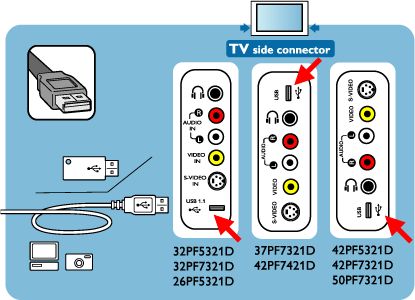
Unplug the TV before you connect your USB device into the USB port. The USB port location is dependent on the model of your TV. Please refer to the picture below.

Note: The USB port is for playback of your digital music or viewing digital photos. Certain digital cameras and computer devices which require driver software are not supported by this connection.
Contact Philips

We are happy to help you

Contact Philips

We are happy to help you

Looking for something else?

Discover all Philips Support options

Back to top

Our site can best be viewed with the latest version of Microsoft Edge, Google Chrome or Firefox.
