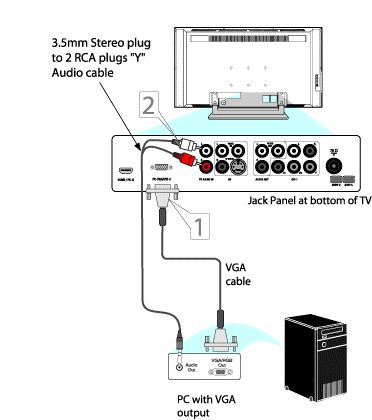
VGA Video Cable connection
- Connect one end of the VGA Video cable to the Monitor (video) output of your computer to the PC-VGA/CVI-2 jack at the bottom of the TV.
- If you wish to have audio connection, the television can reproduce the computer audio out by an Audio Adapter to the Audio output jack on the computer while connecting the other ends of the Audio cables to the Audio In left and right (PC AUDIO IN) input jack at the bottom of the television.
- Turn the television and the computer ON.
- Press the [AV+] button on the remote control to show the [Source] list menu.
- Press the cursor [Up] or [Down] button to select [PC-VGA] and press cursor [Right] to activate.