If your Philips Avent Premium Connected Baby Monitor is sending too many ‘No signal’ alerts on the Baby Monitor+ app, do the following:
-
Check your crib mount to ensure it is installed correctly and that your baby monitor has a proper viewing angle.
-
Make sure no large objects or blankets obstruct the view.
-
Make sure your baby is lying in the detection zone and that the camera is pointed at them.
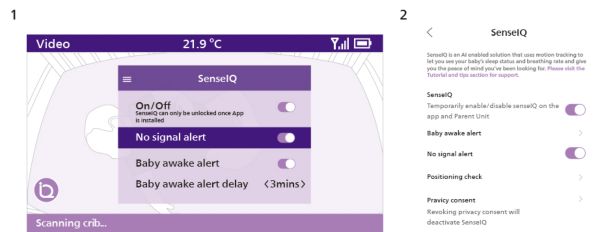
If the above options don’t work, go to Settings > SenseIQ > No signal alert on the app or Parent Unit (see images below) and disable this feature.
If you’ve tried the above steps and are still experiencing issues, contact us.
Image legend:
- Parent Unit SenseIQ Settings
- Baby Monitor+ SenseIQ Settings